When you decide to use Amazon Web Services (AWS) in your project then you voluntarily lock yourself up with Amazon. By default, most of the…
How to Unit Test AWS Services with LocalStack and Testcontainers

When you decide to use Amazon Web Services (AWS) in your project then you voluntarily lock yourself up with Amazon. By default, most of the services have no official local alternative for unit or integration testing. Luckily for most of the services, there is an open-source variant which fills the gap. And most of them were reunited inside Localstack — docker image to serve most of the AWS services locally:
[LocalStackAs another piece of the puzzle, Testcontainers provides an easy way how to run docker images in your unit tests:
[Introduction · TestcontainersIt is very easy to test application using AWS services when we use these two tools together.
I will use Grails AWS SDK SQS Plugin for testing purposes in brand new Grails application. You can either create new a Grails project or download the example sources which are referenced at the end of this article.
We start with adding necessary dependencies to the project — Grails AWS SDK SQS plugin and Testcontainers’ support for Localstack and Spock. Edit build.gradle and add following dependencies at the end of dependencies definition.
compile 'org.grails.plugins:aws-sdk-sqs:2.2.4'

testCompile 'org.testcontainers:spock:1.8.3'
testCompile 'org.testcontainers:localstack:1.8.3'
Then you can create new Grails service in grails-app/services/example directory.
package example

import grails.plugin.awssdk.sqs.AmazonSQSService

class QueueService {

    AmazonSQSService amazonSQSService    String createMainQueue() {
        amazonSQSService.createQueue('Main')
    }
}
The service has only one simple method which uses AmazonSQSService provided by the plugin to create new queue calledMain.
Then we have two options how to setup AmazonSQSService in your test. Let’s start with the more general one which can be easily use everywhere. Create test file in src/test/groovy/example with following content:
We are using Testcontainers’ @Testcontainers annotation for better Spock integration. LocalStackContainer class wraps Localstack’s docker image and add useful methods to help you create a client for the desired service as AmazonSQS in our scenario. As AmazonSQSService is all built around the client we can instantiate it directly by passing the client based on Localstack to the new instance. Then we call the method under test and verify the queue has been created using the same client.
If we would like to fully leverage the power of the Grails plugin (e.g. some shared configuration already set for the application) then we can point protocol, proxyPort and proxyHost configuration properties to the Localstack using doWithConfig method and then manually call afterProperiesSet of AmazonSQSService to emulate the bean initialisation. Using this approach we need to use the client created by the service otherwise, the base URL of the queue will be different as the manual client construction replaces the endpoint whereas construction using afterPropertiesSet only changes the proxy configuration but keeps the original value of the endpoint.
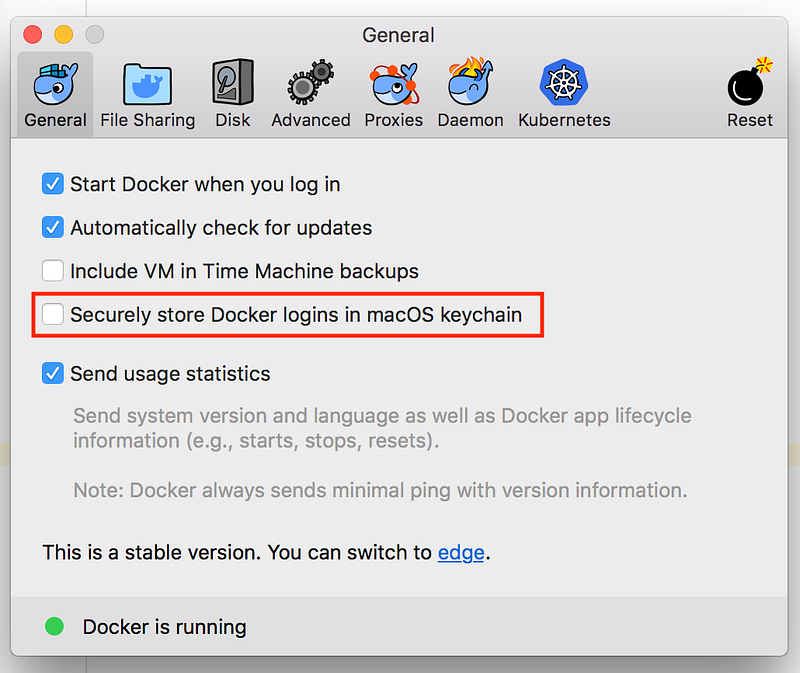
NOTE: When using Docker for Mac (or maybe also for Windows) you may end up with following error:
org.testcontainers.shaded.org.zeroturnaround.exec.InvalidExitValueException: Unexpected exit value: 1, allowed exit values: [0], executed command [docker-credential-osxkeychain, get], output was 26 bytes:
no credentials server URL
In that case, you have to untick Securely store Docker logins in macOS keychain option in Docker / Preferences…
The example application can be found on GitHub:
[musketyr/grails-aws-plugin-with-localstack